Photography is another language of expression, and a way to remember. A personal website feels incomplete without a gallery — if you agree, go take a look at mine. This post is about how I built it.
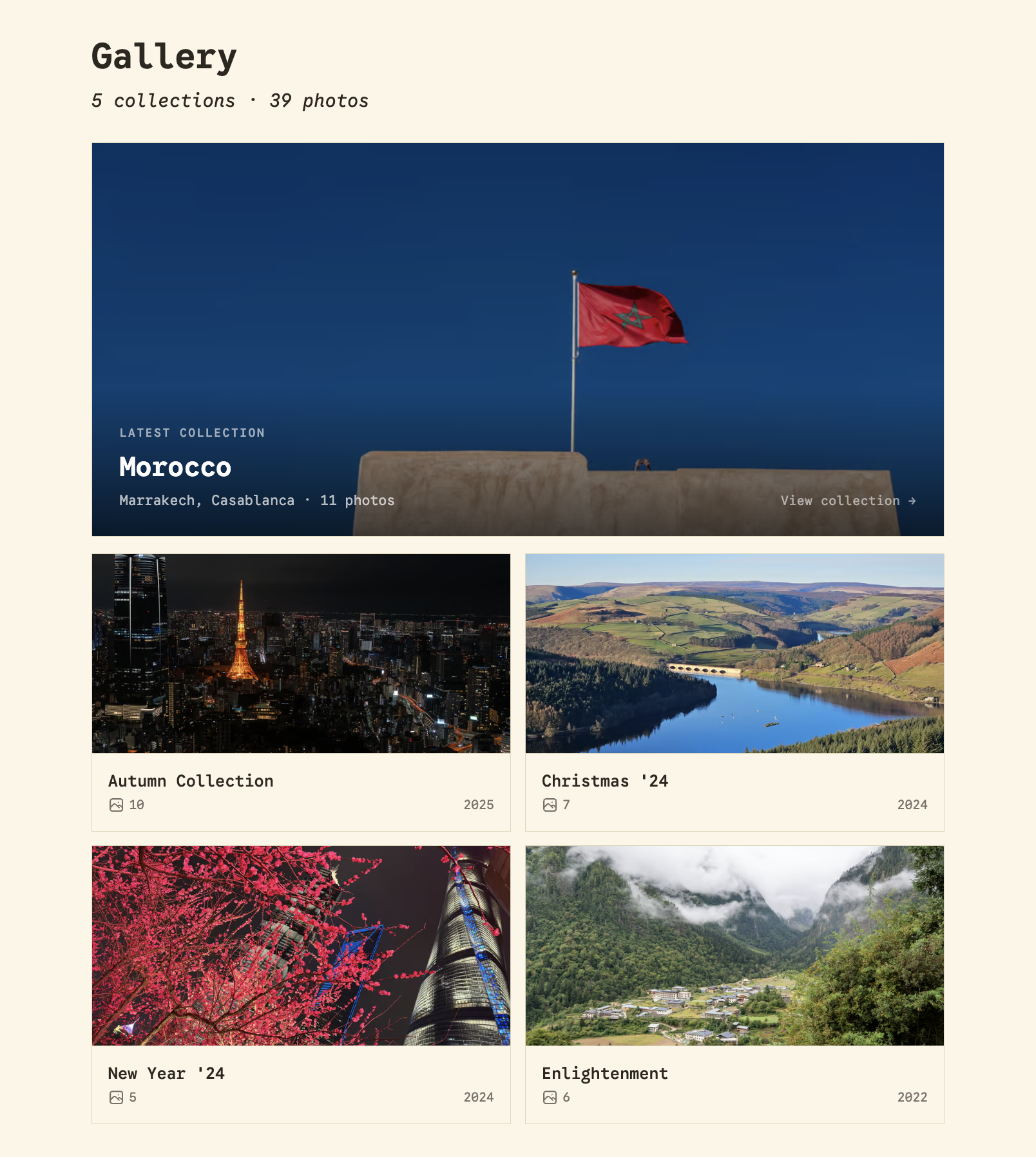
The short version:
- Photos live in Cloudflare R2 — the repo stores only tiny markdown metadata files.
- A sync script turns bucket contents into Astro content collection entries.
- On-the-fly image transformations — the entries are used to construct Cloudflare Image Transformations URLs that serve thumbnails and lightbox variants from one original, cached at the edge.
- WAF rules and a rate limit prevent quota abuse and protect sensitive metadata.
- AI-native workflow — the UI was designed with Claude Design, exported as HTML, and integrated by Claude Code, with my own tweaks on top.
Table of contents
Open Table of contents
Choosing an approach
There are several reasonable ways to show a lot of photos on an Astro site. Before comparing them, I pinned down what the decision actually hinged on:
- Fast builds — deploy time shouldn’t scale with the number of photos.
- Near-zero cost at personal-site scale.
- The metadata is mine — alt text, tags, and locations live where I can version them and build features on them.
With those on the wall, the three candidates:
1. Raw files in the repo with Git LFS, optimised by Astro. With images inside the project, Astro’s <Image /> handles resizing, format conversion, and responsive srcset at build time.
Pros
- Leverages Astro’s image optimisation; zero extra services
- One source of truth
- Works fully offline; nothing to sync
Cons
- LFS complicates every clone, CI runner, and host (Cloudflare Pages needs special configuration for it)
- GitHub gives LFS 10 GB of free storage and bandwidth, metered beyond that — and every fresh CI clone pulls the whole archive against that meter
- Build time scales: every build re-processes hundreds of originals
2. A hosted image service (Cloudinary, imgix, and friends). Upload photos, get URLs back, append transformation parameters.
Pros
- Excellent at the core job: on-the-fly resizing, format negotiation, responsive helpers
- Extras like auto-tagging and a media library
- Zero infrastructure on my side
Cons
- Expensive for a personal website
- The metadata drifts out of my hands — it lives in a vendor’s database, not my repo
- Lock-in compounds quietly, and I’m too young to be locked into anything :)
3. Cloudflare R2 + CDN image transformations. The site is already on Cloudflare. Photos go into an R2 bucket in plain trip folders (Morocco25/DSC00941.jpg), and Image Transformations resizes anything on the zone via a URL prefix, caching results at the edge. No thumbnail-generation step exists anywhere.
Pros
- Cheap!
- The repo stores only metadata — clones are instant, and builds never touch a pixel
- One original serves every size, cached at the edge by default
- Metadata in the repo, typed and versioned
Cons
- Everything is DIY: the sync script, the metadata scaffolding
- Bucket and repo can drift until the sync runs — though the script can be automated
- The transformation URL exposes its parameters — anyone can rewrite
width=800, and every unique combination burns quota (addressed in the protection section)
| Criterion | Git LFS + Astro | Hosted service | R2 + CDN transforms |
|---|---|---|---|
| Build time as archive grows | Scales with pixels | Metadata only | Metadata only |
| Cost at personal scale | LFS quotas bite fast | Trial-shaped free tier | Effectively $0 |
| Metadata ownership | In git | Vendor database | In git |
| Moving parts | LFS config everywhere | None | Sync script |
Summary: it looks like there’s no reason not to use R2 + CDN transforms.
From bucket to browser
The architecture is two halves that never block each other. At build time, the site learns what photos exist: a sync script mirrors the bucket into the repo as metadata, and the build bakes image URLs into static HTML. At request time, the browser fetches the actual pixels — straight from Cloudflare’s edge, never through my build or any server of mine.
build time — learn what exists
──────────────────────────────
R2 bucket
  Morocco25/DSC00941.jpg
      │  pnpm sync:photos
      ▼
git repo
  Morocco25/DSC00941.md ← path, alt
  Morocco25/_album.md ← title, cover
      │  astro build
      ▼
static HTML — 2 image URLs per photo

request time — fetch pixels
───────────────────────────
browser
      │  GET thumbnail URL
      ▼
edge cache ──hit──▶ tens of KB, done
      │  miss
      ▼
transformer ─▶ R2 original (1–16 MB)
  resize, re-encode, cache at edge
The starting point: the sync script
Astro has no idea what photos exist in the R2 bucket until it sees the entries generated by the sync script. The script uses the R2 API to list the objects in the bucket; for each folder it creates an _album.md, and for each photo a markdown file with the path and alt text. It never overwrites existing entries — hand-written metadata is safe — and it flags entries whose photo has disappeared from the bucket, deleting them when run with PRUNE=1. The bucket stays the single source of truth for what exists.
Metadata lives in git
Each photo is one markdown file — just the R2 path plus whatever I add by hand:
---
id: morocco25-dsc00941
path: Morocco25/DSC00941.jpg
alt: ""
tags: []
---
Each album folder gets an _album.md (the _ prefix keeps it out of the photos collection) for human-facing metadata:
---
title: "Morocco"
location: "Marrakech, Casablanca"
season: "Winter"
year: 2025
month: 12
cover: DSC00994
---
Both collections have Zod schemas to keep everything type-safe.
Constructing the URL
The original files in R2 are directly accessible through a custom domain, e.g.
https://daiyixuan.com/website-gallery/Morocco25/DSC00941.jpgBut always requesting the original would be wasteful and slow. Thankfully, the Cloudflare Image Transformations API can resize and re-encode on the fly, and the transformation URL is just a prefix in front of the original:
https://daiyixuan.com
  /cdn-cgi/image                      ← Cloudflare's transformation endpoint
  /width=800,format=auto,quality=80   ← the recipe: which variant to produce
  /[origin path]                      ← the source: the original, served from R2
Putting it together
Time to cook! For this first version of the gallery I only had two image sizes in mind: a thumbnail for the quick overview, and a full-screen lightbox variant. So the entire “pipeline” is one function and two presets:
const ZONE = "https://daiyixuan.com";
const ORIGIN = "https://daiyixuan.com/website-gallery";

export const IMAGE_PRESETS = {
  /** Grid thumbnails, album covers, hero. */
  thumb: "width=800,format=auto,quality=80",
  /** Full-screen lightbox variant. */
  full: "width=2560,format=auto,quality=90",
} as const;

export function cfImage(
  path: string,
  preset: keyof typeof IMAGE_PRESETS = "thumb"
) {
  return `${ZONE}/cdn-cgi/image/${IMAGE_PRESETS[preset]}/${ORIGIN}/${path}`;
}<img
src={cfImage(photo.data.path)}
data-full={cfImage(photo.data.path, "full")}
alt={photo.data.alt || album.title}
loading="lazy"
/>Browsing the grid only ever downloads lazily loaded 800px thumbnails. Nobody pays for the big rendition until they click a photo, at which point the lightbox reads data-full and fetches the 2560px variant on demand. The numbers are pleasing: a typical thumbnail arrives as a ~15 KB AVIF and the lightbox variant at around 200 KB, while the multi-megabyte original never travels to anyone’s browser. And the build stays fast — the whole site, 5 albums and 39 photos included, builds in about 2 seconds.
One trade-off worth naming: none of this touches Astro’s own image pipeline, so we lose Astro’s automatic image optimisation — but in exchange we get fast builds and a light repo. And having avoided vendor lock-in, I’ve admittedly coupled myself to Cloudflare’s URL scheme instead — though if I ever need to move, cfImage() is the one place to change.
Protecting the data
Convenient as the transformation API is, it raises two concerns:
/cdn-cgi/image/…accepts any options, and the free plan includes 5,000 unique transformations a month — past that, new variants simply fail. An attacker can’t run up my bill, but they can take the gallery down for the month.- The transformer fetches originals from a public path, which means anyone reading the page source can download the raw camera files. For phone photos, the file itself isn’t the secret — the EXIF is. GPS coordinates turn an open originals path into a public map of everywhere I stood.
Fortunately, Cloudflare’s free plan includes five custom WAF rules and one rate-limiting rule. Two custom rules cover the two concerns:
-
Lock transformations to the presets. Any
/cdn-cgi/image/request whose options aren’t exactly one of the two presets is rejected, so nobody can mint new variants and drain the quota.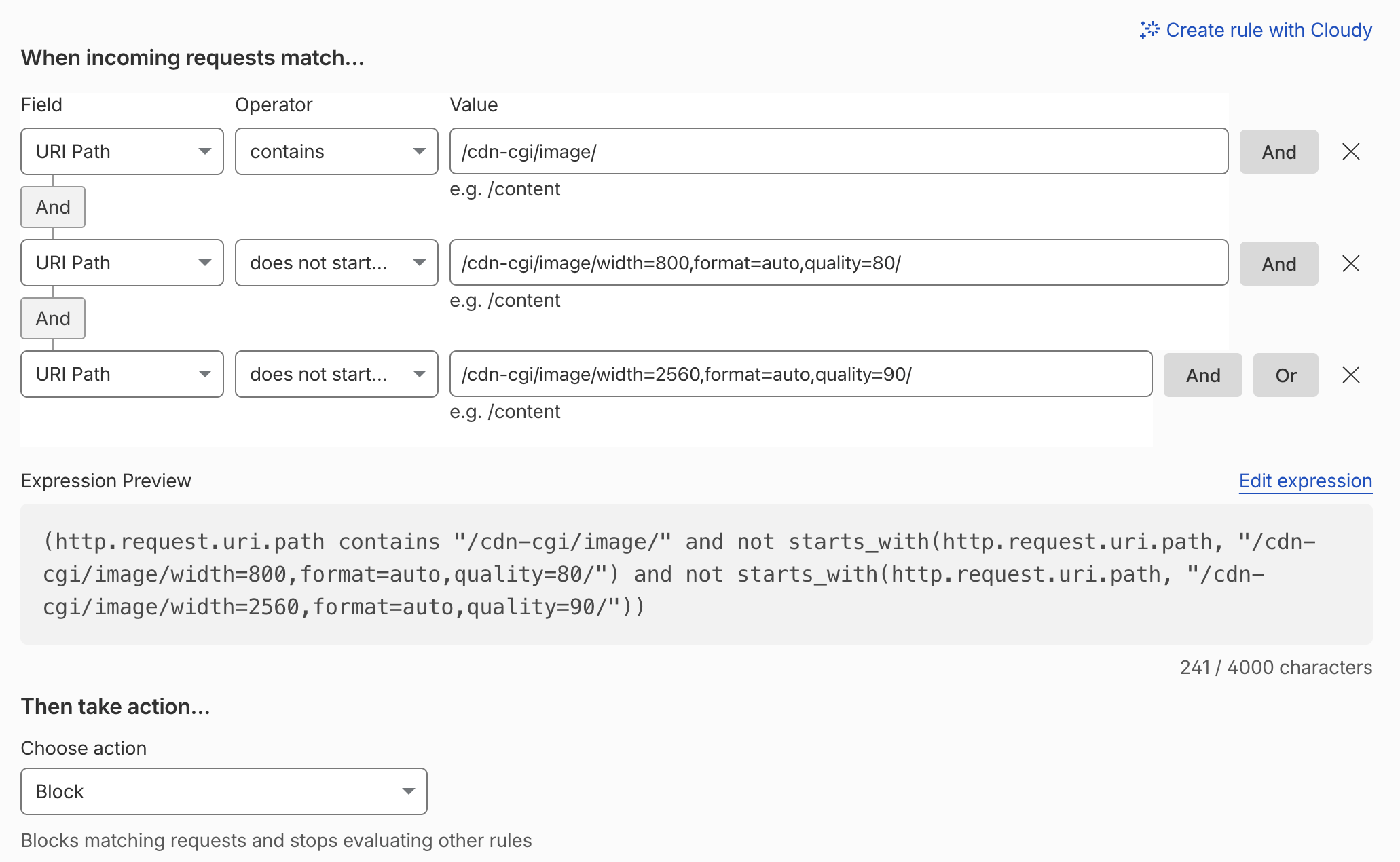
Locking transformations to the two allowed presets. -
Block direct access to the originals. Only the image transformer should fetch raw files; everyone else gets blocked. It’s good hygiene against casual scraping, even when the files aren’t secret.
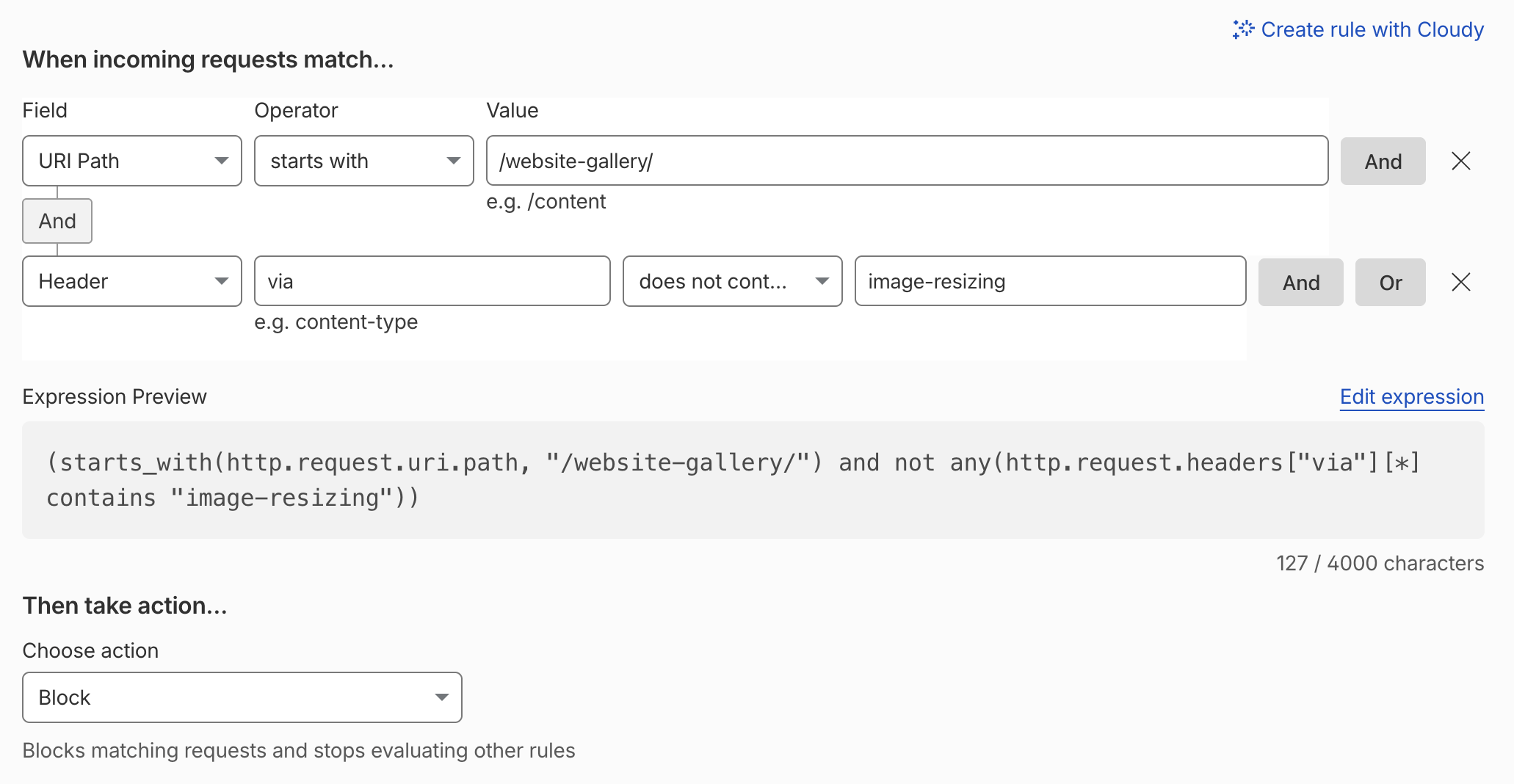
Blocking direct access to the original files in R2.
And as a backstop, the rate-limiting rule caps request volume on the /cdn-cgi/image/ path to blunt malicious traffic:
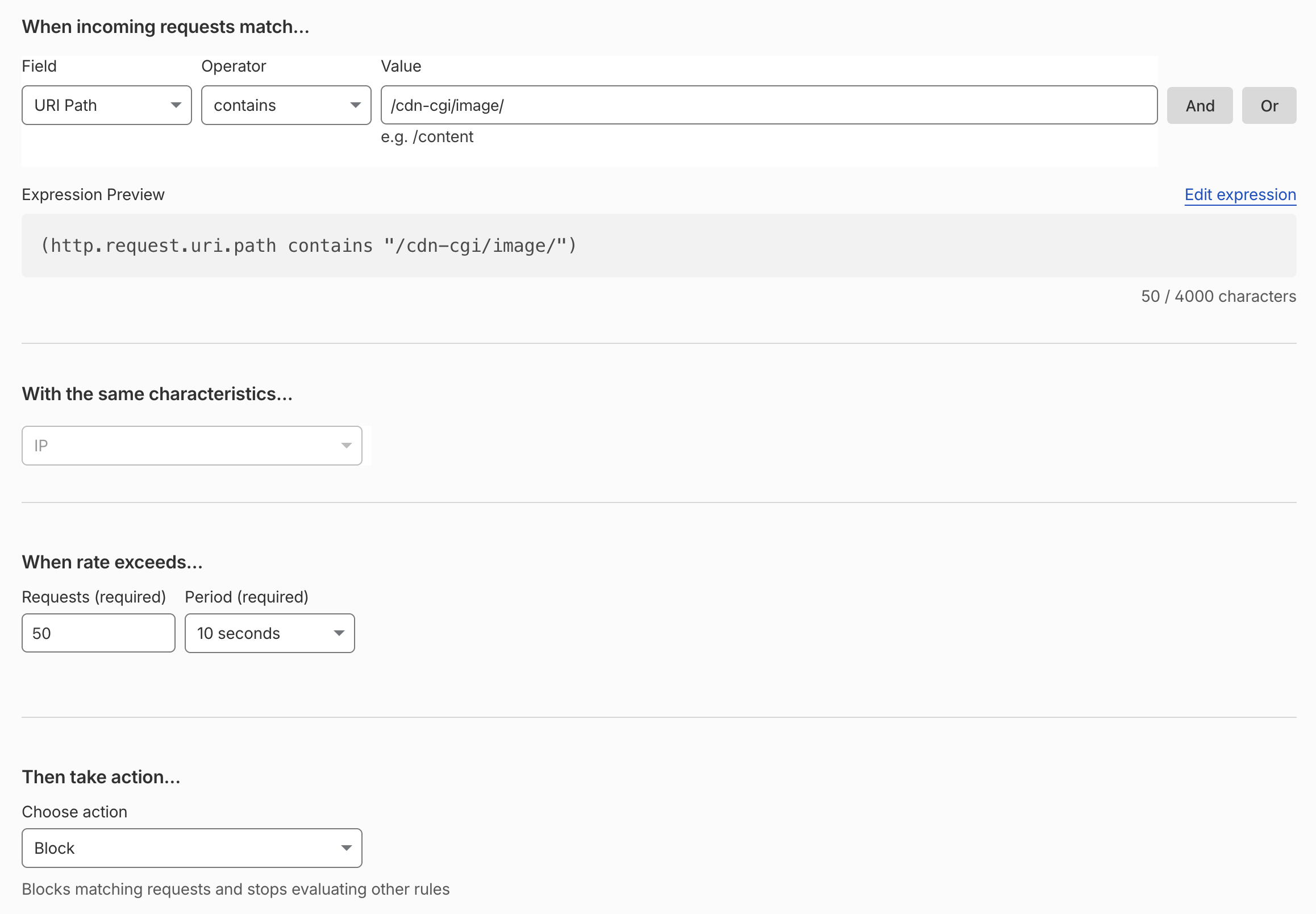
That’s all the protection needed. Here’s what happens when someone breaks the rules — say, by requesting a transformation that isn’t allowed:

It looks like we’re good to go! The photos in the R2 bucket are now wired into the website and protected. Time to build the user interface.
Meet Claude Design
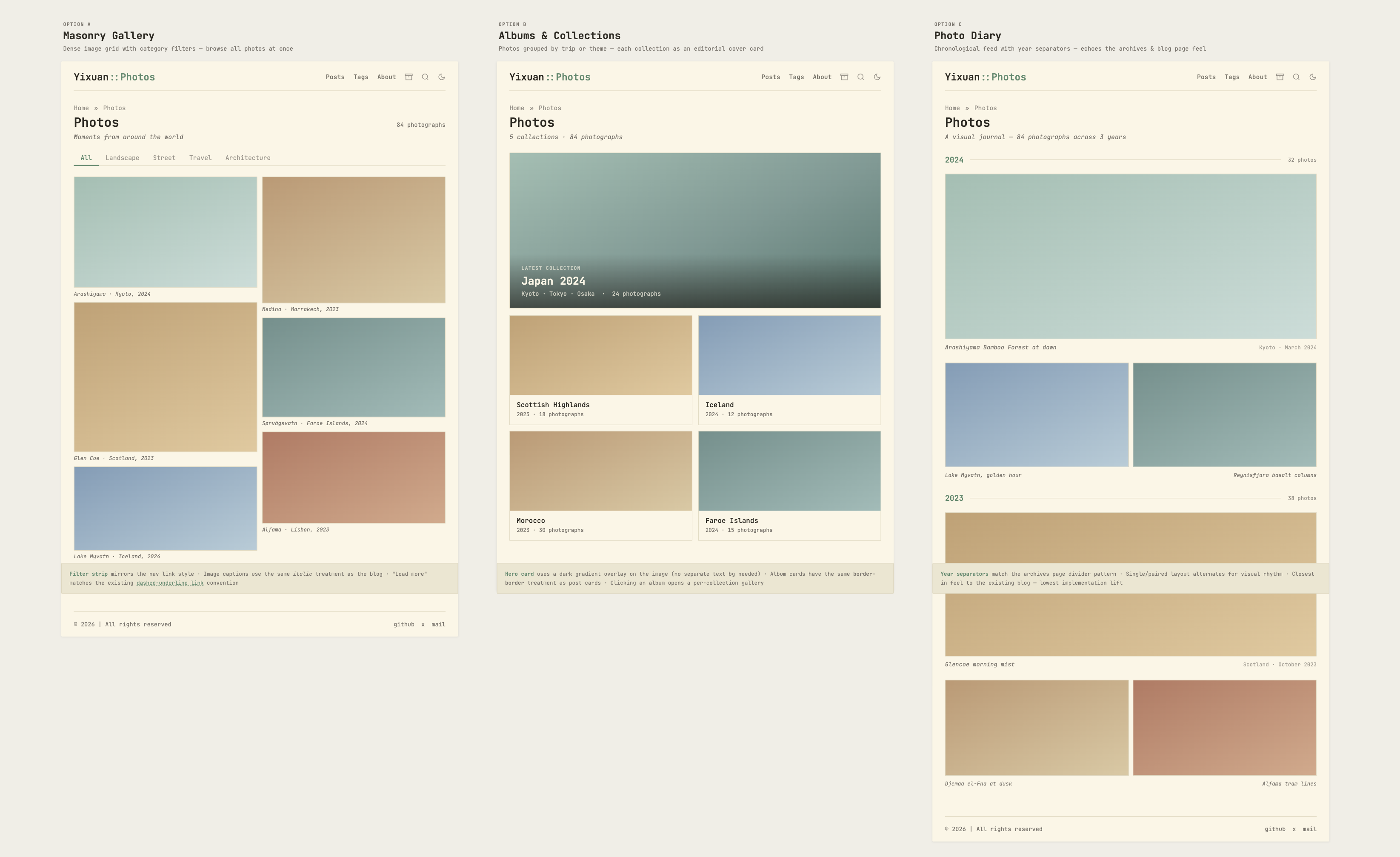
Claude Design has been out for a while, but I hadn’t had a chance to try it until now. The prompt was quite simple — I didn’t spend much time crafting it. I just asked it to read the code to get a sense of the current design, then follow the existing design language and produce a few options for the gallery page.
Here are the options it produced:
I did the same for the album page:
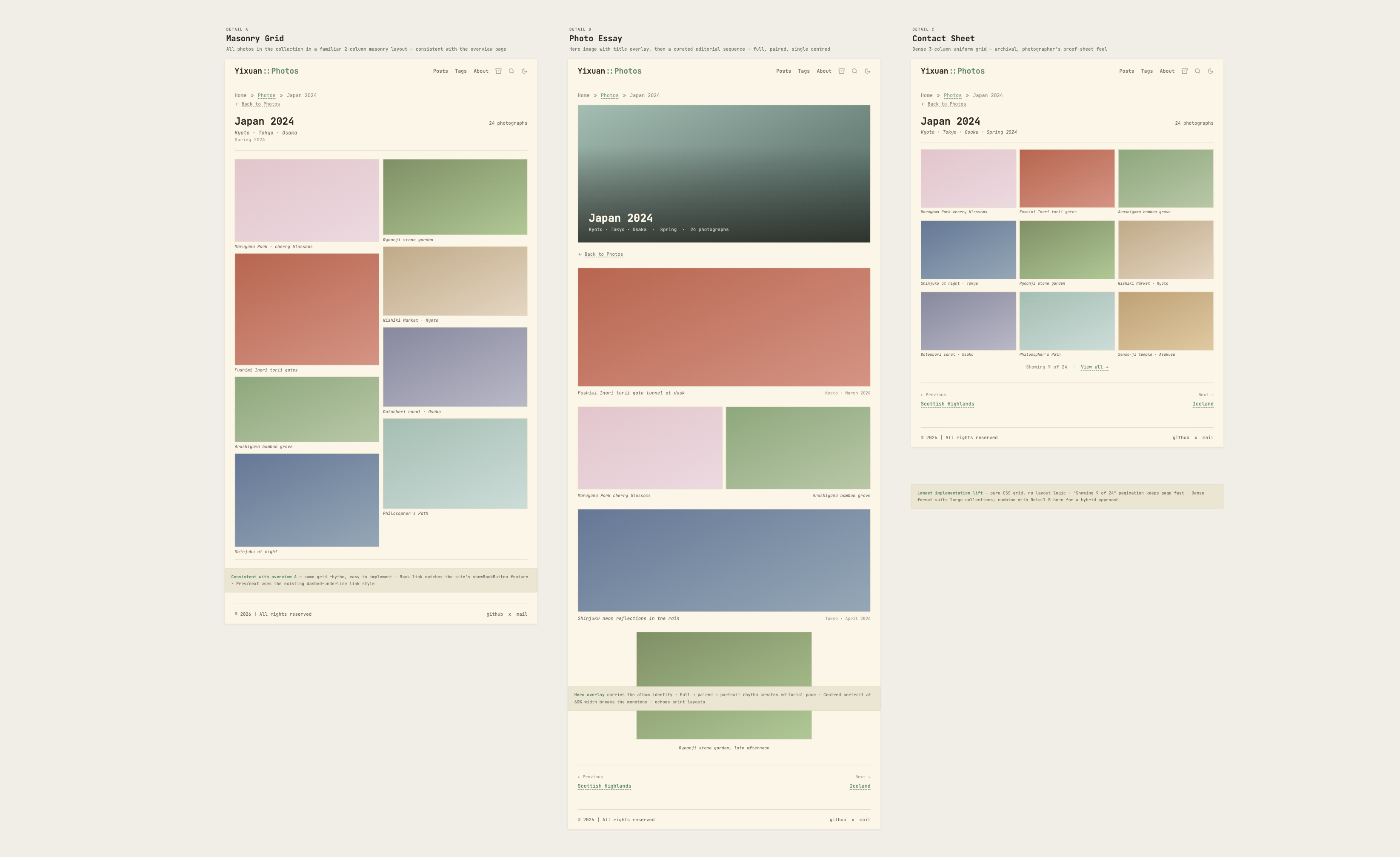
Honestly, they look good to me — though I don’t know why some options on the canvas are longer than others, or why they get cut off by the message label… I don’t know which variant you’d choose, but you can find my pick on the real gallery page.
The implementation was just as simple: I exported the design as HTML and asked Claude Code to integrate it into the project. I did make several tweaks of my own, though — small things Claude wouldn’t know I cared about: the album grid drops to a single column on phones (two columns felt cramped), the cards grow taller there so the covers can breathe, and the “12 photographs” label became a little photo icon with a count. None of it is dramatic, but it’s the part that makes the page feel like mine.
The last mile: loading UX
The last piece of the puzzle is the lightbox and its loading states. The lightbox itself is just a modal that shows the full-size image, with buttons to move to the next and previous photos.
As mentioned earlier, the full-size image is large, and on a cold cache it can take a second or two to load. Making the user wait for the image before the lightbox opens is obviously unfriendly — but so is a blank frame while it loads. My approach is to show the already-cached thumbnail, scaled up and blurred, with a spinner on top, then swap in the sharp image when it arrives.
The video below shows the loading state in action — the load is intentionally delayed here to make the transition from blurred thumbnail to sharp image visible.
On a warm edge or browser cache, the loading state may be barely visible. The View Transitions API — used across the site — makes the handoff feel even smoother by animating between the grid thumbnail and the lightbox image. Often, the larger rendition is ready by the time that transition finishes.
That’s the complete story of how I built the photo gallery from scratch: Cloudflare R2 as the storage, Cloudflare Image Transformations for resizing on the fly, and Claude Design for rapid UI prototyping.
Final thoughts
AI compresses the exploration, not the judgement.
I’ve been coding with AI for a long time, so building this gallery was no exception. One thing became especially clear during the process: AI is remarkably capable of gathering information, outlining possible approaches, and surfacing their trade-offs in minutes, and of course, writing the code. But the decisions still belong to the developer. For this project, they depended on priorities only I could rank: fast builds, near-zero cost, and ownership of my metadata. The same is true of the UI. Exploring several gallery layouts used to take an afternoon; with Claude Design, it takes a prompt. But choosing the variant that fits the site, and deciding which details to refine, still comes down to taste. AI is an incredibly fast pair of hands, but judgment and taste don’t compress. They matter more than ever.